
Frequently Asked Question
Windows 11 says “Check the spelling of the name” for my QNAP share, but older PCs still connect. What should I check?
QUICK ANSWER
Treat this as a connection/authentication check, not proof that the folder disappeared. Newer Windows SMB security requirements can expose an old guest-access or signing configuration.
Applies to: Windows 11 clients accessing QNAP SMB shares. Current QTS/QuTS hero and legacy QTS 4.3.3/4.3.4 need different vendor guidance.
Work through these checks
- Confirm the path and connection. Test the NAS's current address from the same trusted LAN. Check that the share exists and compare the working computer's exact path.
- Use a named account. Connect with a NAS user that has the required folder permission. Check Windows Credential Manager for an obsolete entry, without altering credentials for unrelated servers.
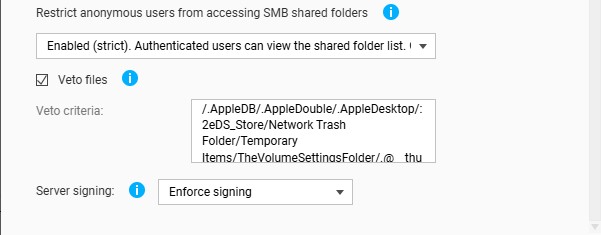
- Review the NAS SMB configuration. On the documented QTS layout, inspect Control Panel > Network & File Services > Win/Mac/NFS/WebDAV > Microsoft Network (SMB) > Advanced Options. Follow the supported Server signing setting for the installed release.
- Respect older-platform limits. Check the model's supported firmware and QNAP's specific legacy guidance before changing settings. Keep an agreed access/rollback plan for shared environments.
Confirm the result
The named user can open and use an authorised test folder from the affected Windows computer while the required SMB protections remain enabled.
Before going further: Do not enable SMB1, disable required signing or open all shares to guest access as a general workaround.
If you need help
Include these details in your ticket: Windows build, NAS model/software, exact error and SMB/signing configuration without passwords.
Related guidance: File Sharing: How to set up user's privilege for shared folders on Synology NAS? · Why can Windows 11 24H2 no longer open my Synology shared folders?
Updated 261111