
Frequently Asked Question
Why is the web shortcut missing after migrating a container to Container Station 3?
After migration to Container Station 3, a container can keep running while its web shortcut disappears. QNAP documents this for uncommon web ports when the migration does not establish the Default web URL port. Check that setting before changing the container itself.
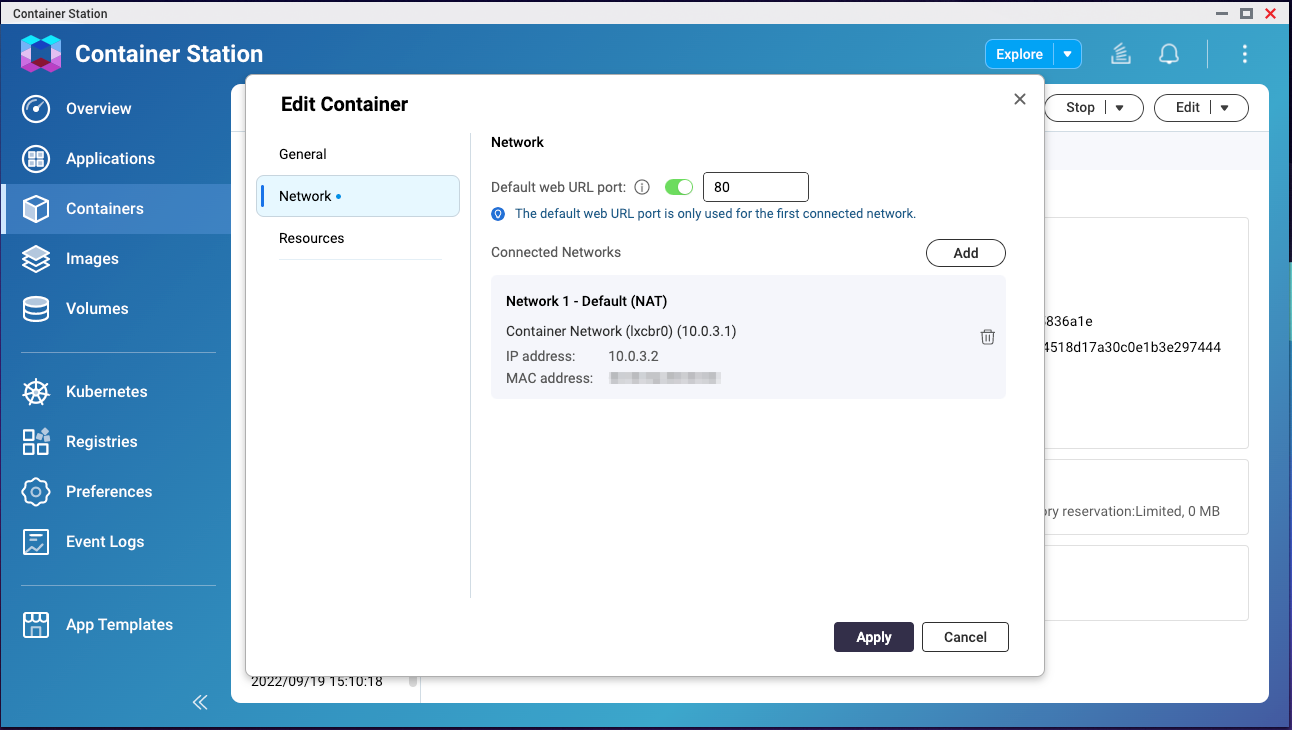
- Check the service first. Open Container Station and confirm that the intended container is running. Note its image tag, network type and existing port mappings. If the application already opens through its known local address, the missing shortcut is a separate interface issue.
- Edit the container’s shortcut port. Go to Containers, select the container and choose Edit > Network. Enable or edit Default web URL port and enter the application’s internal container web port.
- Use the internal port, not the host mapping. For an NGINX container mapped as host port 8081 to container port 80, this field is 80. Use the actual application configuration; 80 is an example. QNAP notes that this setting applies to the first connected network.
- For an application, use its dedicated setting. In Applications, select the application, choose Edit and open Default Web URL Port. Select the relevant service and its internal port. Apply the change.
- Verify the shortcut. Return to the container list and use the web shortcut, or the application’s Web URL link. This feature requires an HTTP or HTTPS service. A database or other non-web service does not need a browser shortcut.
No recreation is needed just to repair this setting. Recreating a container can discard data held outside persistent volumes or bind mounts. Do not remove volumes, pull an unrelated image tag or expose a router port to make the shortcut appear.
If the link appears but the service fails, submit an ACE Support ticket with the image/tag, redacted logs, network mode and host-to-container port mapping. Do not share environment variables containing passwords or API keys.
Need help? Submit an ACE Support ticket.
Updated 221213