
Frequently Asked Question
Why are photos or videos missing from QuMagie even though they exist in File Station?
Files existing in File Station do not automatically make them visible in QuMagie. The photo library also depends on content sources, access permissions, supported media and indexing. Begin with one known file so that changes remain easy to verify.
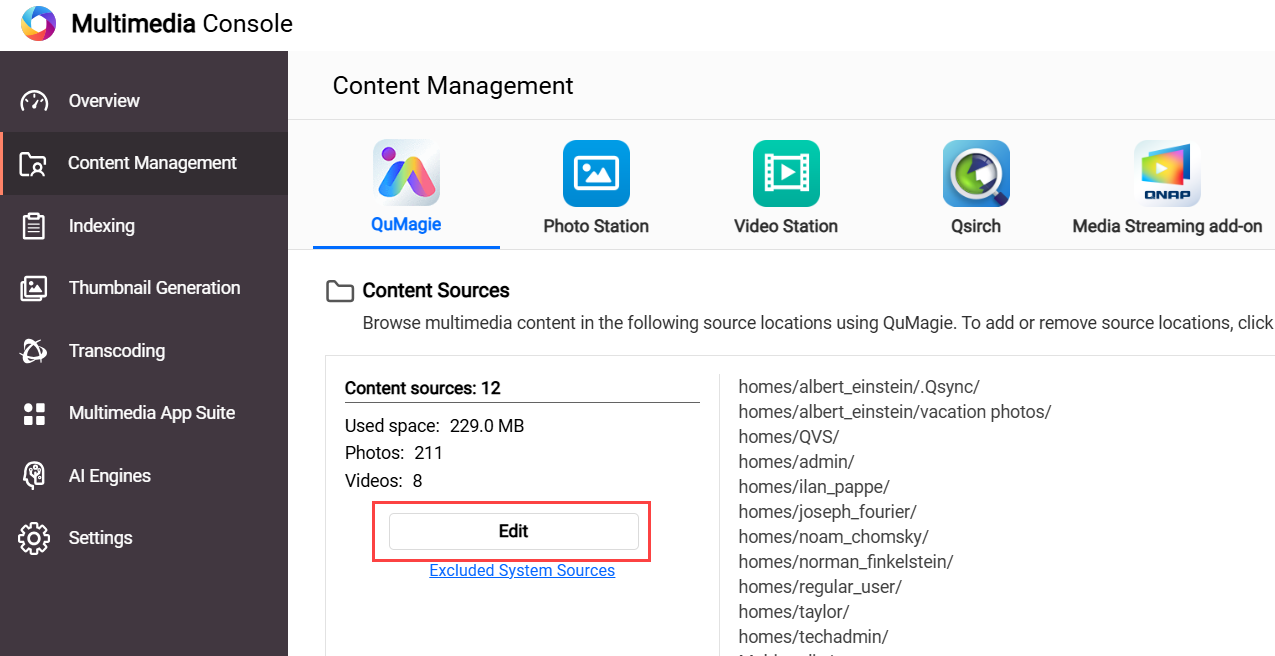
- Confirm that the original is present. Using the affected user account, locate and open one missing file in File Station. Record its path and format. If the file is missing there too, investigate the storage or upload first rather than rebuilding QuMagie.
- Check QuMagie’s content source. Open Multimedia Console > Content Management > QuMagie. Under Content Sources, choose Edit and confirm that the appropriate shared folder is included. Add only authorised folders; indexing unrelated personal folders can change what becomes available in the library.
- Check read access and media support. Have the administrator confirm the intended user’s folder/file read permissions. Do not grant everyone full access to solve one account’s problem. Unsupported formats, codecs or a required CAYIN Media Viewer entitlement can affect display or thumbnails.
- Check processing before restarting it. In Multimedia Console > Indexing, check whether the status is Indexing or Completed. Allow active processing to finish. Also check Thumbnail Generation > Status. In QuMagie’s display settings, review whether Only display media files with generated thumbnails is hiding the file.
Important before Re-index: QNAP states that re-indexing deletes and rebuilds indexed information, including thumbnails, media tags and QuMagie albums. The original media files are not erased by that operation, but library organisation can be lost. Preserve the necessary information and discuss this step with our Support Specialist before using it as a recovery action.
Verify: the same user can see and open the test file in QuMagie after the relevant check completes. If it remains absent, submit an ACE Support ticket with model, firmware, QuMagie/Multimedia Console versions, file dimensions/size and redacted processing status. Share sample media only if authorised.
Need help? Submit an ACE Support ticket.
Updated 260223