
Frequently Asked Question
Why does QVPN Client connect but show Limited access or no NAS applications?
A connected VPN tunnel and the QVPN Client application list are separate checks. QNAP documents Limited access when the client uses the wrong NAS administration port, cannot retrieve port information through the chosen connection identity, or meets a firewall restriction.
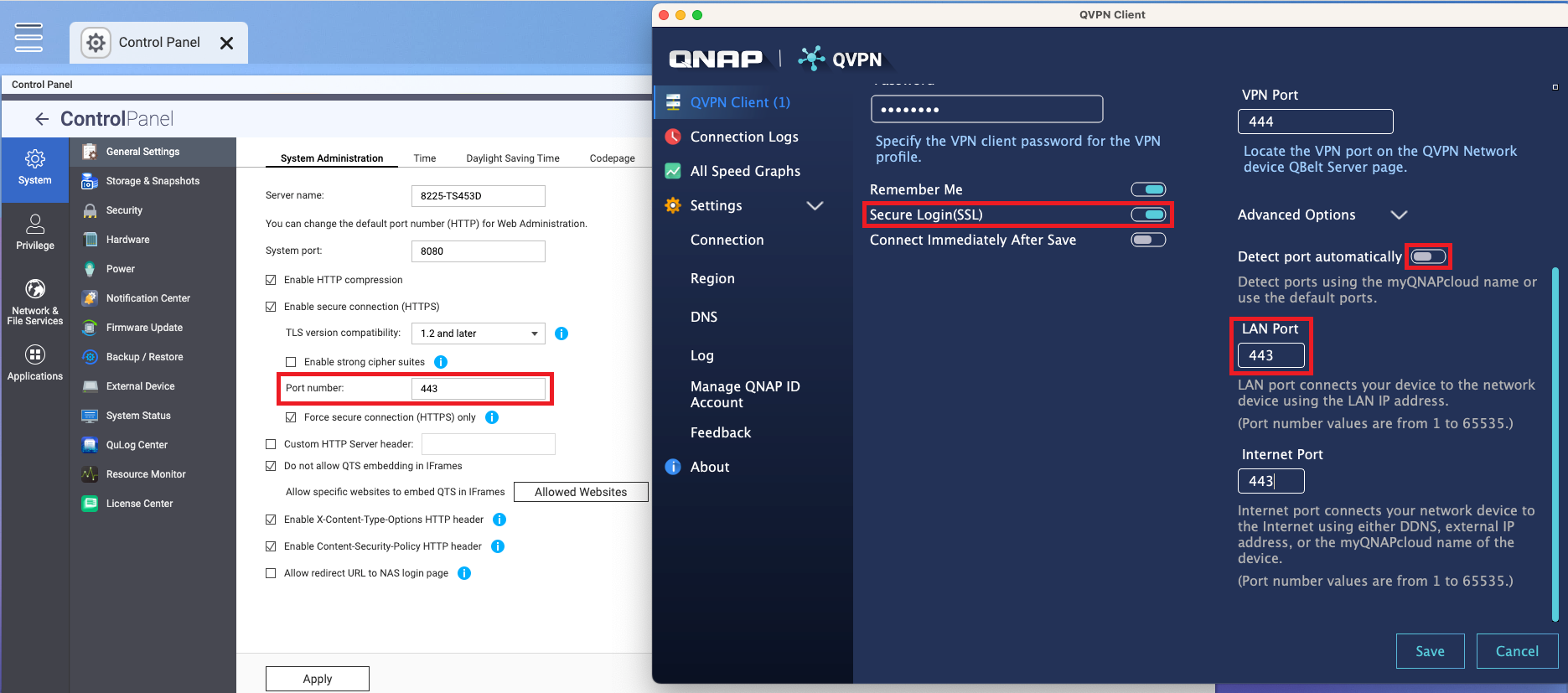
- Keep an authorised local connection available. Note the NAS firmware, QVPN Client/Service versions and VPN profile. Record whether the tunnel connects and whether direct access to the NAS over the tunnel works. Do not change the NAS administration port simply to match a remembered default.
- Read the actual NAS port. On the NAS, open Control Panel > System > General Settings > System Administration. Note the configured port. If the client profile uses Secure Login (SSL), use the configured HTTPS port.
- Correct the saved profile. In QVPN Client, select the profile’s action menu and Edit Profile. Open Advanced Options, turn off Detect port automatically, and enter the matching NAS port in LAN Port. Save and reconnect. Retain the secure-login setting.
- Check the remaining branch. If the profile was created using an external IP or alternate DDNS name, the owner can use Import from QNAP ID to obtain the linked device information. If QuFirewall denies the VPN traffic, have the administrator review the actual VPN subnet and required access rules.
Verify: reconnect, check the application list and open the intended NAS service through the tunnel. If application discovery works but an SMB share still fails, investigate share permissions and VPN routing separately.
Do not expose NAS administration or SMB ports publicly to fix this symptom. Submit an ACE Support ticket if it persists, including redacted profile settings and connection logs. Never share VPN keys, account passwords or complete configuration files containing secrets.
Need help? Submit an ACE Support ticket.
Updated 250121