
Frequently Asked Question
Why is my HBS 3 backup a .qdff folder when QuDedup is disabled, and how do I restore it?
A .qdff backup is not necessarily evidence that QuDedup was left enabled. QNAP confirms that HBS 3 version management also creates backups in .qdff format. Treat the folder as a backup set rather than ordinary folders that can be rearranged manually.
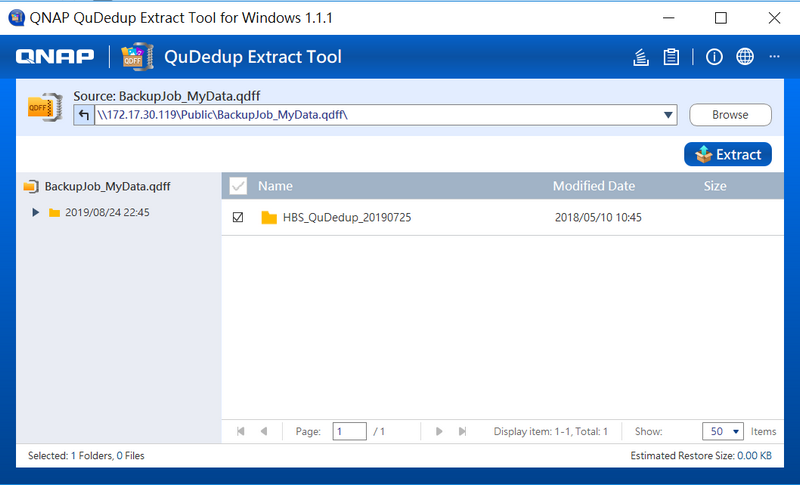
- Check the job settings and preserve the backup. Identify the job, destination and required backup date. Record whether version management is enabled. Keep the complete
.qdfffolder and its contents together; do not rename, merge or delete internal files. - Choose a supported restore method. On a QNAP NAS, create an HBS restore job for the existing backup set. On a supported computer, use QNAP’s QuDedup Extract Tool. Obtain the utility through the official QNAP download route for your operating system.
- Select the required data. In QuDedup Extract Tool, use Browse file, select the
.qdfffolder, then choose the version and files to extract. Select Extract and choose a new, empty destination folder with sufficient free space. - Protect existing destination files. The conflict options include Replace All and Skip All. Replace All overwrites same-name files at the destination. A separate empty recovery folder avoids that risk for the first test.
- Check the recovery result. Wait for the extraction or restore task to finish, review its result and open several recovered files. Verify the expected date/version before copying recovered data back into a live folder.
Changing future backup format is a separate decision. QNAP states that version management is chosen when the job is created. Deleting a working job is not required to recover an existing backup. Keep the existing restore path and retention plan until any replacement job has been tested.
If the set cannot be opened, submit an ACE Support ticket with the HBS/Extract Tool versions, backup source, encryption status and exact error. Keep any encryption password securely with the owner; do not put it in the ticket or edit the backup internals.
Need help? Submit an ACE Support ticket.
Updated 260529