
Frequently Asked Question
Why does QVR Pro stop recording when storage is full after an unexpected shutdown?
If QVR Pro stops creating recordings when its space fills after an abnormal shutdown, QNAP identifies a possible recording database or file system problem. A working live camera view does not establish that recording and overwrite are healthy.
Before a file system check: back up important accessible data and export any required footage. The affected QTS volume is unmounted and inaccessible during the check; shares, iSCSI services and recording on that volume can be interrupted. Arrange an approved maintenance window. If the pool is degraded, disks show errors or footage is irreplaceable, ask our Support Specialist before proceeding.
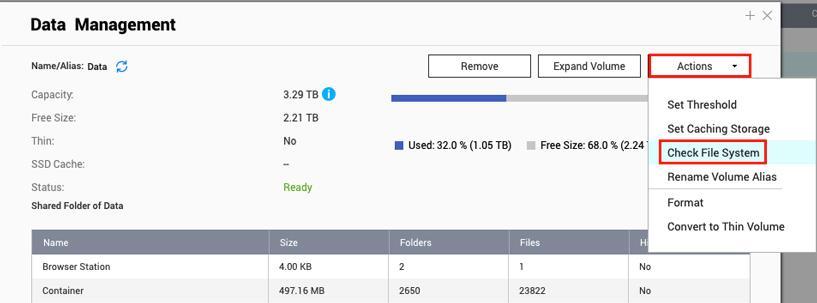
- Confirm the symptom and storage type. Note when recordings stopped and whether the NAS lost power or was forced off. Check the recording status, relevant storage location and volume warnings. Record the installed QVR Pro and QTS versions.
- Check storage health first. Review Storage & Snapshots for disk, pool and volume warnings. Do not format the volume, remove recording space or delete the recording database as a first response.
- On QTS, run the approved volume check. Open Storage & Snapshots > Storage > Storage/Snapshots, select the relevant volume and choose Manage > Actions > Check File System. Read the confirmation and allow the check to complete. Check the other affected QTS volumes if the assessment requires it.
- Verify both recording and retention. After storage is available, check QVR Pro’s recording status, play a new sample and confirm that the intended overwrite/retention behaviour resumes. Monitor for fresh storage or recording errors.
This menu is a QTS procedure. For QuTS hero or an unavailable menu, use an ACE Support ticket for the appropriate storage diagnosis.
If overwrite remains broken, send the abnormal-shutdown time, volume status, QVR Pro logs and relevant warnings through the ticket. Avoid repeated forced restarts or manual deletion of recording folders.
Need help? Submit an ACE Support ticket.
Updated 250923