
Frequently Asked Question
Active Backup for Business recovery media cannot see my SSD or network adapter. What should I do?
QUICK ANSWER
The recovery environment needs drivers for the target computer’s storage and network controllers. A working Windows installation does not guarantee those drivers are present on the recovery USB.
Applies to: Windows bare-metal recovery with Synology Active Backup for Business.
Work through these checks
- Boot the recovery media and identify the missing component: storage controller, SSD or network adapter. Record the computer model, controller type and whether the device is visible in firmware setup. Do not begin a restore onto an uncertain disk.
- Obtain signed, matching drivers from the computer or controller manufacturer. Match the recovery environment’s architecture; an installer executable alone may not provide the extracted .inf driver files needed by WinPE.
- Use the recovery wizard’s driver-loading option where available, or rebuild the media using Synology’s documented manual procedure with the required drivers. Automatic media creation is intended for a matching Windows and driver environment.
- Restart into the rebuilt media and confirm both the destination disk identity and the intended NAS connection. Keep Secure Boot and storage-mode settings consistent with the supported recovery design.
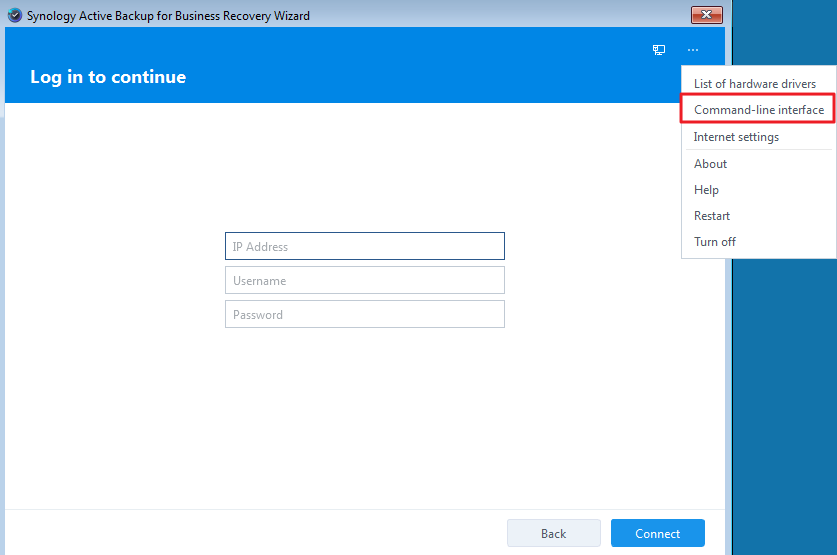
Genuine Synology recovery-guide example: the wizard has its own hardware and network environment. The highlighted command-line entry is not an instruction to run a recovery command. Tap the image to enlarge. Interface details may differ by software version.
Confirm the result
The wizard detects the correct destination capacity, connects to the NAS and lists the required restore points before any overwrite is approved.
Before going further: Restoring erases selected destination data. Stop if disks remain missing, encryption recovery material is unavailable or the proposed disk mapping is unclear.
If you need help
Include these details in your ticket: PC/controller model, Windows architecture, ABB and recovery-media versions, driver package and the missing-device screen.
Updated 261107