
Frequently Asked Question
How do I troubleshoot Active Backup for Business error 0x80042301 on a Windows computer?
Error 0x80042301 means the protected Windows device could not create the required snapshot. Check Windows VSS and its writers before changing the NAS backup repository.
Applies to: Active Backup for Business protection of supported Windows computers or physical servers. Application and NAS compatibility must be checked for the exact model and versions.
Before you start: Restarting VSS-related or application services can interrupt other work. Have the Windows administrator plan service changes, particularly where Microsoft iSCSI or production databases are in use. Keep existing backup versions.
Check and resolve
- Record the failed device, affected volume, task time and exact code from Active Backup for Business. Correlate the same time in Windows event logs so you investigate the source device that failed.
- Check the source volume size. Synology notes that Windows VSS does not support volumes larger than 64 TB for this snapshot path; changing NAS free space will not remove that source limitation.
- Open services.msc on Windows. Review Microsoft iSCSI Initiator Service, Microsoft Software Shadow Copy Provider and Volume Shadow Copy. Synology's procedure calls for Automatic startup and Running status; the Windows administrator should assess dependencies before applying changes.
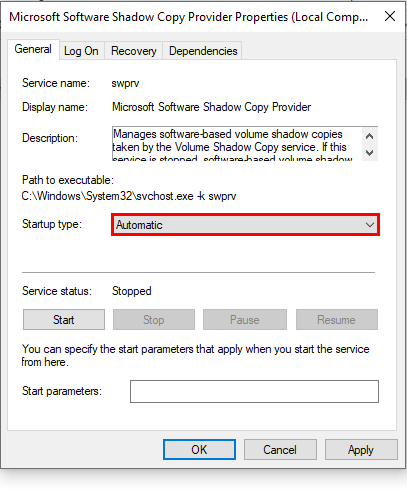
Official Windows service example: Microsoft Software Shadow Copy Provider with Startup type set to Automatic. - From an elevated Command Prompt, run vssadmin list writers. Record any writer that is not stable and its error. This is a diagnostic listing, not a command to delete shadow copies.
- During an agreed maintenance window, address the affected service or writer using the application's supported procedure, then list the writers again. Avoid stopping an unfamiliar database writer just because a forum suggests it.
- If the fault continues, have the administrator investigate Windows component corruption with the supported System File Checker process and retain the relevant event records.
Check the result
The writers are stable, a fresh ABB backup succeeds and a small file can be restored from that new version.
Need help?
Submit Ticket with the ABB log time, Windows event details, volume size and VSS writer output. Remove usernames and confidential paths where possible.
Updated 260922