
Frequently Asked Question
Why is Hyper Backup skipping backups with a timeout waiting for integrity check message?
This message can indicate a scheduling collision. Hyper Backup waits for an active integrity check, then skips the queued backup if the wait exceeds three hours.
Applies to: Hyper Backup tasks on DSM 7.x, including supported DSM 7.3 systems, reporting the specific timeout waiting for integrity check message.
Before you start: Preserve the backup repository and recovery history. Do not delete the task, remove backup versions or switch off integrity checks simply to clear this scheduling error.
Check and resolve
- Open the failed task's log and confirm the exact timeout message. Note the scheduled backup time, integrity-check start/end times and whether a check is still active.
- Open the task's schedule settings. Compare the backup window with the integrity-check window and allow the check to finish before the next backup starts. Choose timings based on measured duration, rather than assuming a short quiet period is enough.
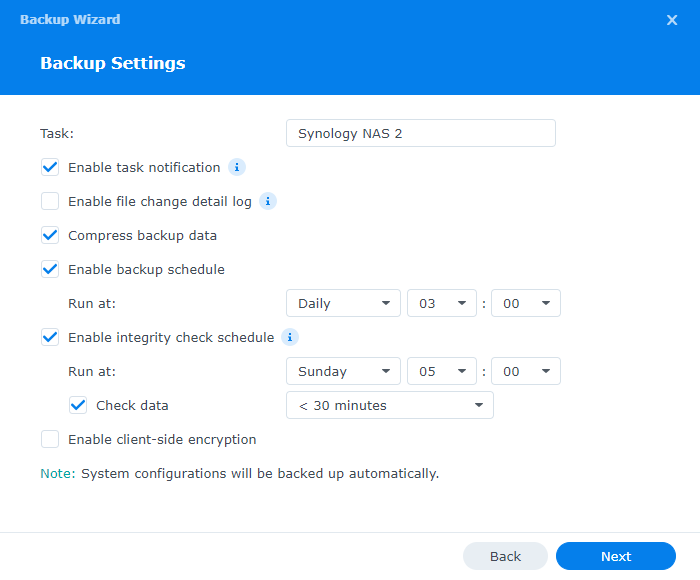
Hyper Backup’s official wizard example shows separate backup and integrity-check schedules. The illustrated times are examples. - If checks regularly take longer than three hours, review the destination's health, available space and observed read/write performance. Check whether the delay is new or follows a larger repository or more retained versions.
- Distinguish the backup-data check from the index-structure check. A time limit can restrict the data portion, while the index is still checked each time. Use the available settings with the recovery policy in mind.
- After the current check finishes, run one backup and watch its log. Confirm that a completed new recovery version appears.
- Keep the revised schedules under observation for the next automatic cycle. A manual success does not prove that the scheduled overlap has been resolved.
Check the result
The integrity check and the next scheduled backup both finish without the timeout. Restore a small test file to a separate location to confirm recovery works.
Need help?
Submit Ticket if the destination appears unhealthy or the check no longer progresses. Include task timings, log messages and destination type, with credentials removed.
Updated 260810