
Frequently Asked Question
Why can I watch a Surveillance Station camera live but not find the expected recordings?
Live view and recording use separate settings. Check the intended time, recording mode, event log and archive access before assuming the footage has been deleted.
Applies to: Surveillance Station 9.x on DSM 7.x. Archive settings moved into Recording > Archive Settings in 9.1 and later; exact event options depend on the camera.
Before you start: Export important clips that are still available before changing retention or storage. Increasing a quota cannot recover footage already rotated out. Do not delete archive folders to make recording resume.
Check and resolve
- Choose one camera and a precise missing time period. Confirm the camera and NAS time/time zone so you are searching the correct point on the timeline.
- Open IP Camera > Edit > Recording > Schedule and check the selected recording type for that time. Continuous recording differs from motion/event recording; check whether Home Mode supplied a different active schedule.
- For event recording, review Event Log for the expected trigger. If it is absent, check the supported detection source and camera event settings before adjusting storage.
- Review the assigned recording storage, free space and retention/stop-recording rules. Confirm the archive is available and that recording has not been intentionally disabled.
- If clips exist in File Station but are missing from the Recording app, check the shared folder's System internal user permissions. The SurveillanceStation user needs the required read/write access; review only the recording folder.
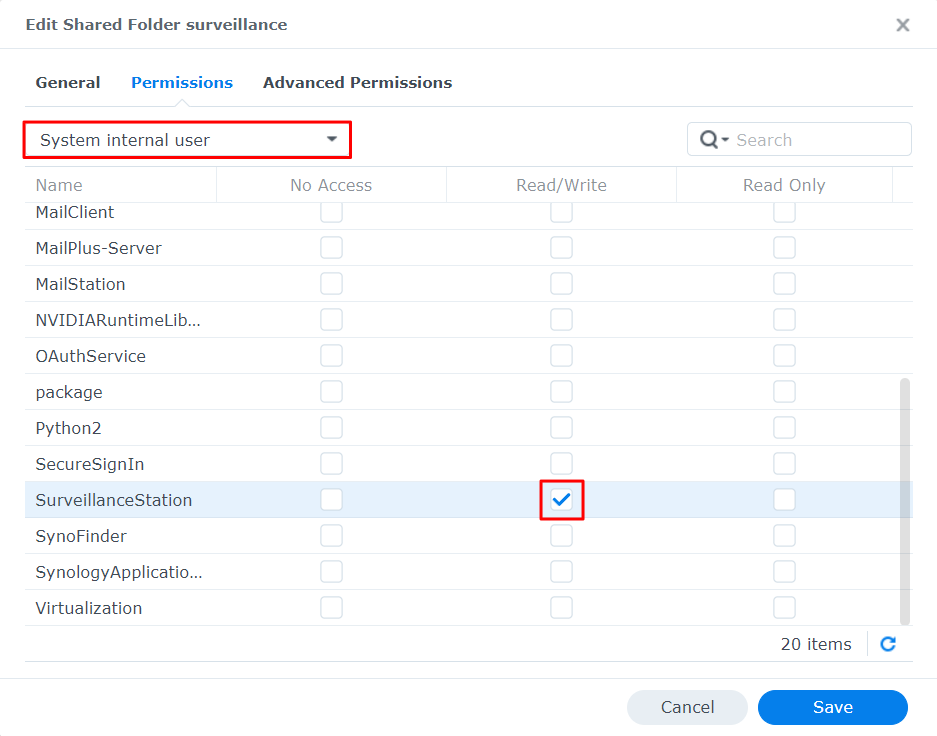
In the surveillance folder’s permissions, the official example selects System internal user and gives SurveillanceStation Read/Write access. - Make a short controlled recording and search for it immediately. If playback reports a codec problem, compare the camera's actual stream format with the configured format rather than treating every playback failure as missing footage.
Check the result
The controlled clip appears at the correct time, plays from the intended client and remains available under the chosen retention settings.
Need help?
Submit Ticket with the camera, exact missing period, recording mode and relevant Event/System Log messages. State whether files are visible in File Station.
Updated 260817