
Frequently Asked Question
My Foscam camera cannot recognise or format its microSD card. How can I check it?
QUICK ANSWER
Verify the exact camera’s supported card capacity and file system, preserve any required footage, then use its supported formatting method. A repeated formatting request can also indicate a failing or unsuitable card.
Applies to: Foscam models with microSD recording; capacities and FAT32/exFAT support vary by model.
Work through these checks
- Power down as required by the model’s card-handling instructions before removing or inserting the card. Check its label, capacity, condition and the camera’s supported specification; a higher-capacity card is not automatically compatible.
- If existing recordings matter, stop and preserve them before formatting. Formatting erases the card. Do not accept a computer’s request to initialise a card containing the only evidence you need.
- On supported models, open the camera in the Foscam app and review SD card Recording Settings > SD card Info, or the equivalent VMS storage page. Use the model’s documented Format control only after the data is protected.
- If formatting fails or capacity remains missing, test a known-good supported endurance card. Keep the original card for diagnosis. Once recognised, confirm recording destination, schedule and camera time.
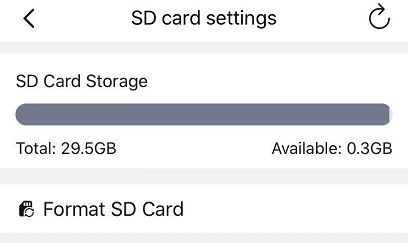
Genuine Foscam B4 manual example: review card status first. Format erases recordings; preserve required footage before using it. Other models may show a different storage page. Tap the image to enlarge. Interface details may differ by software version.
Confirm the result
Trigger a harmless test event, wait for the clip to finish and play it back. Repeat after a normal restart to check that the card remains recognised.
Before going further: Do not cycle through repeated formats of a failing card. A firmware or camera fault needs assessment if a known-good compatible card also fails.
If you need help
Include these details in your ticket: Model/firmware, card make/capacity, exact format error and whether another supported card works.
Updated 261107