
Frequently Asked Question
ESET PROTECT shows duplicate computers or a cloning question after imaging PCs. What should I do?
QUICK ANSWER
Resolve the device identity deliberately. A new physical clone, a reimaged existing computer and an agent reinstallation are different cases; deleting duplicate rows first can lose useful history without fixing the cause.
Applies to: ESET PROTECT and PROTECT On-Prem with supported Windows cloning/hardware detection.
Work through these checks
- Identify which real computers are connecting and whether the source was a master image, a one-off clone, a hardware replacement or an agent reinstall. Compare last connection and device details privately.
- Open the cloning question where present. A genuinely additional one-off computer normally needs a new identity; a non-persistent VDI design may need controlled matching to existing identities. Choose according to the documented deployment, not the display name alone.
- For a verified hardware change to the same device, review Accept changed hardware only this time. Avoid Accept changed hardware every time as a shortcut because disabling hardware detection is irreversible in the documented workflow.
- Review the master-image process and subscription seats after resolving the question. An old non-connecting record following agent reinstallation is a separate Double Agent case and needs history review before removal.
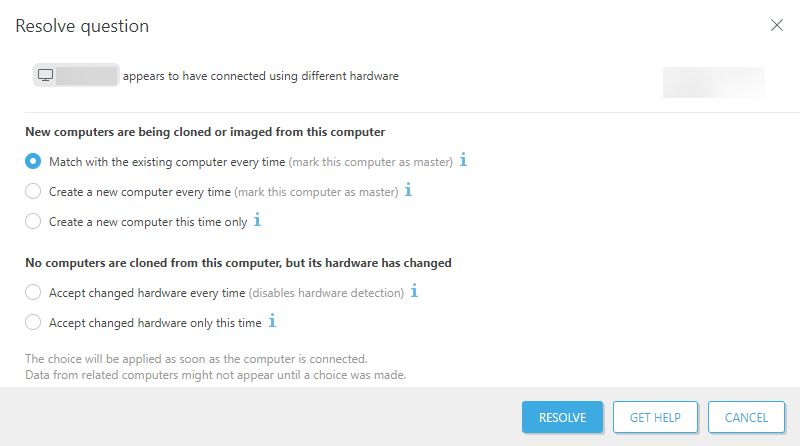
Genuine ESET PROTECT example: choose according to the real deployment. The selected option in this example is not a universal recommendation. Tap the image to enlarge. Interface details may differ by software version.
Confirm the result
Each intended physical device or VDI session reports under the correct identity, with expected policy, recent connection and subscription allocation.
Before going further: Do not bulk-delete history, disable hardware detection or clone full-disk-encrypted endpoints without a supported deployment plan.
If you need help
Include these details in your ticket: PROTECT/agent versions, physical or VDI environment, imaging/reinstallation sequence and the redacted question/options shown.
Updated 261107