
Frequently Asked Question
ESET says Protected browser could not be started or shows 0x847695d0. How do I fix it?
QUICK ANSWER
Confirm a supported browser and update the ESET application first. ESET documents restarting the Safe Banking & Browsing feature as a recovery step; protection must be re-enabled before returning to sensitive browsing.
Applies to: ESET Windows home/small-office applications with Safe Banking & Browsing, formerly Banking & Payment Protection.
Work through these checks
- Record the exact error, ESET version, browser and Windows system type. On ARM devices, check the supported-browser list; current ESET guidance lists Edge and Firefox for this feature.
- Open Safe Banking & Browsing from ESET’s main window, using Show more features if necessary. Compare this direct launch with the ordinary browser shortcut to identify a launch or redirection problem.
- If the documented feature reset is needed, close sensitive sessions, turn off only Safe Banking & Browsing, restart Windows and turn that feature back on. Do not conduct banking while its additional protection is paused.
- Launch the secured browser again and confirm its protection indicator. If it still fails, retain the error and seek assistance before reinstalling, especially on a managed computer.
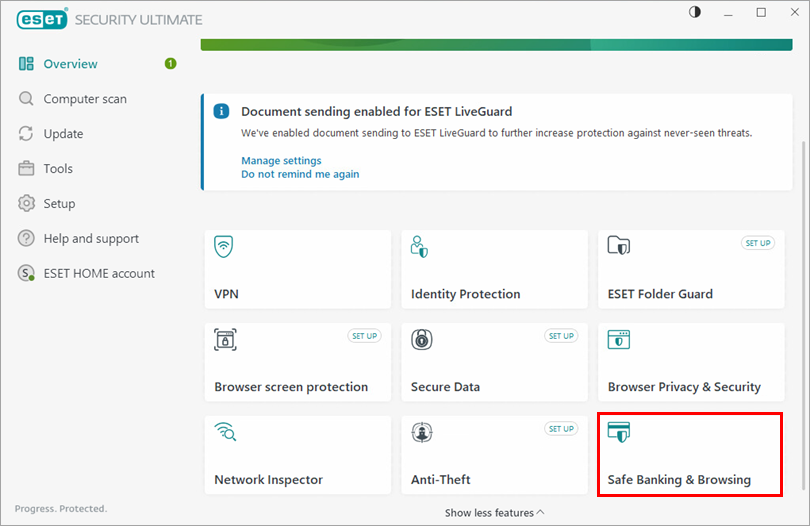
Genuine ESET example: launch Safe Banking & Browsing from the application and verify protection before sensitive browsing. Tap the image to enlarge. Interface details may differ by software version.
Confirm the result
The supported browser launches with ESET’s secured indicator and the feature remains enabled after a normal restart.
Before going further: Do not leave protection disabled, whitelist an unknown banking site or share financial pages in screenshots. Keep managed-policy changes with your administrator.
If you need help
Include these details in your ticket: ESET/browser/Windows versions, ARM or x64 system type, exact error and direct-launch result.
Updated 261107