
Frequently Asked Question
My printer or NAS stopped working after an ESET firewall change. How do I allow only the correct device?
QUICK ANSWER
Use the firewall’s recent-blocked-communication view to identify the actual app or device. Create a narrow exception only after confirming it is the intended trusted connection. Disabling the entire firewall is not a lasting fix.
Applies to: ESET Windows products with a firewall; centrally managed endpoints may require an administrator policy.
Work through these checks
- Verify the printer/NAS identity and current IP from its own screen or your authorised network inventory. Record whether printing, scanning, file access or only discovery fails; those are different connections.
- Reproduce one harmless attempt, then open ESET Setup > Network protection > Resolve blocked communication where available. Review the matching local application or remote device and the time of the attempt.
- Unblock only the verified entry required for that task. Do not approve unrelated blocked items or assume the router’s IP is the printer’s address. Ask the administrator if a managed policy prevents a local change.
- Repeat the exact test with protection enabled. Check the created rule’s scope and the intended network profile so a private device is not automatically trusted on public networks.
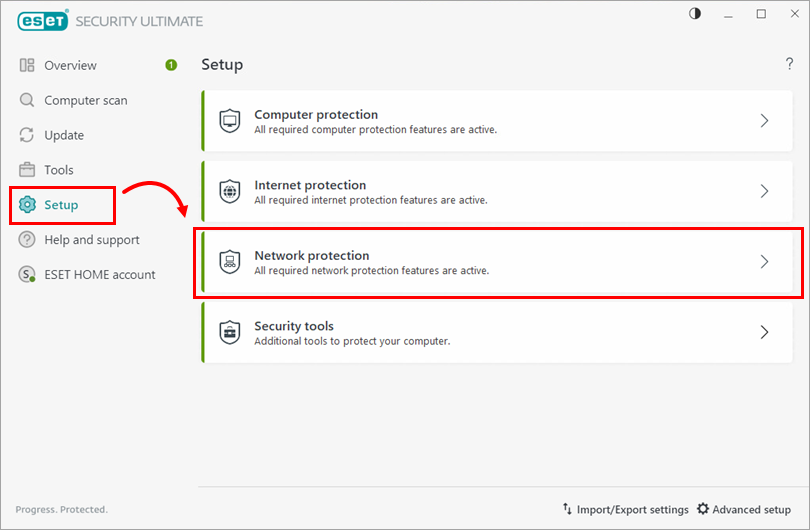
Genuine ESET interface example: open Network protection to investigate the intended connection. Tap the image to enlarge. Interface details may differ by software version.
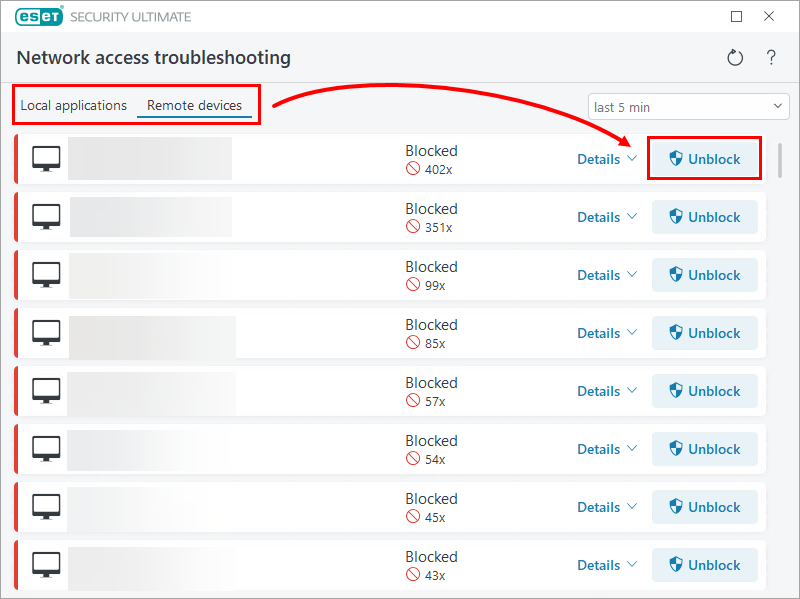
Genuine ESET interface example: identify one verified app or device before allowing it. Do not unblock the whole list. Tap the image to enlarge. Interface details may differ by software version.
Confirm the result
The required print, scan or file operation works with the firewall still active. Other security settings remain at their intended policy.
Before going further: Do not add broad address ranges, allow every application or remove intrusion-detection protection simply because a device is on the LAN.
If you need help
Include these details in your ticket: ESET product/version, affected operation, verified device IP and a redacted matching blocked-communication entry.
Updated 261107