
Frequently Asked Question
Why are port forwarding, DHCP and parental-control options missing from my Deco app?
QUICK ANSWER
Check whether Deco is in Access Point mode. In that mode, the upstream router manages addressing and routing, so several router-only controls are unavailable in Deco.
Applies to: TP-Link Deco systems supporting Router and Access Point operating modes. Features vary by model and firmware.
Work through these checks
- In the Deco app, check More > Advanced > Operation Mode or the equivalent menu for your app version. Record the current mode before changing it.
- In Access Point mode, configure DHCP reservations and port forwarding on the upstream router. Deco forwards traffic on that router's network rather than creating its own routed subnet.
- If you need Deco's router features, plan the network first: internet/WAN details, upstream router role and the location of existing forwarding rules. Switching modes restarts the system and can change client addressing.
- Keep a single deliberate routing design. Avoid adding another router just to reveal a missing menu, which may introduce double NAT. Ethernet backhaul remains available in Access Point mode.
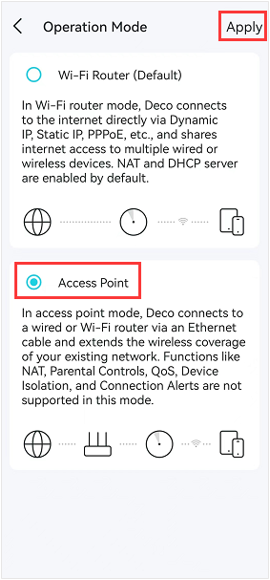
TP-Link Deco app example: operating mode determines which routing features are available. Tap the image to enlarge. Interface examples may differ from your version.
Confirm the result
Confirm which device supplies the client's gateway and DHCP lease. Then check the required feature on that router and test the application from the correct network.
If you need help
Include these details in your ticket: Deco model/firmware, app version, operation mode and a simple modem-router-Deco connection diagram. Hide public credentials.
Updated 261107