
Frequently Asked Question
Why does my Deco still use Wi-Fi backhaul after I connect an Ethernet cable, or go red when I wire the units?
ACE SUPPORT · TP-LINK
Deco wired backhaul starts automatically after the units belong to the same mesh. Check operating mode, topology and the cable path before changing advanced switch settings.
Applies to
Ethernet-capable Deco models, including ACE-listed Deco X50 Pro, X50-5G and X75, with matching regional firmware. Model-specific Ethernet port speeds differ. This article does not assume that every named X50 variant has identical power or port features.
Before you begin
Do not connect cables in a way that creates a network loop. Keep one clear test path and preserve existing switch configuration.
Do not disable spanning tree or loop protection across a business network based on a forum fix. Switch-specific compatibility needs an administrator's review.
Work through these checks
- Check the Deco app to confirm the units are already part of the same mesh. TP-Link recommends adding the units wirelessly first, then connecting the Ethernet cables. Check current operating mode before changing the wiring.
- In Router mode, connect a satellite behind the main Deco: directly to its LAN port or to a switch connected to that LAN port. Do not connect that satellite to the ISP-side network in front of the main Deco.
- In Access Point mode, the permitted topology differs because the upstream router handles routing. Follow TP-Link's AP-mode diagram, and avoid creating duplicate paths through a wall socket or extra patch cable.
- Use a short known-good cable directly between the main and one satellite for a comparison, bypassing wall cabling and the switch. Inspect the satellite in the app's network map to see whether its connection type changes to Ethernet. Check that a selected IPTV port is not being used for backhaul.
- If direct wiring works but the switch path fails, note the switch model, ports and settings. TP-Link documents that Ethernet backhaul depends on IEEE1905.1 traffic and that some switches/configurations interfere. Ask the switch administrator to investigate the specific path instead of removing network safeguards globally.
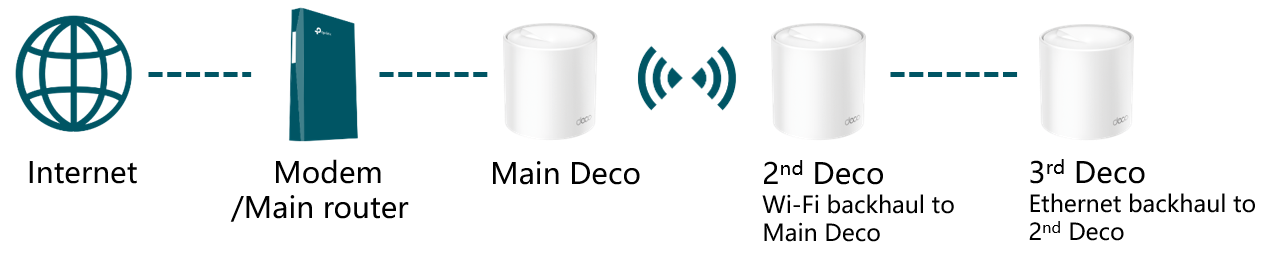
Official TP-Link mixed-backhaul example. This is a wiring diagram, not a screenshot of an ACE installation. Manufacturer guide
Confirm the result
The app reports Ethernet for the wired satellite and the network stays online after reconnecting the intended path. Confirm a client attached to that satellite has usable internet and repeat after a normal restart.
When to contact us
Give our Support Specialist the exact Deco and switch revisions, operation mode, a redacted wiring diagram and direct-cable comparison. This distinguishes topology/cabling from a reproducible switch or device case.
Related ACE guides
Updated 170713