
Frequently Asked Question
Why can a shared Tapo user see live view but not recordings or camera settings?
ACE SUPPORT · TP-LINK
Check which storage is being viewed and which sharing system and permission tier both accounts have. Current Device Sharing 2.0 differs from older Tapo sharing guidance.
Applies to
Tapo cameras, including C200/C210/C220/C225, shared through separate TP-Link accounts. Device Sharing 2.0 is a gradual account rollout, so app and account availability must be checked instead of assuming that every user has the same controls.
Before you begin
Do not share the owner's password to bypass permissions. Invite the person's own TP-Link account and grant only the access they need.
Advanced access includes sensitive settings and SD-card management. Review the recipient carefully; choose a specific-device share when whole-home access is unnecessary.
Work through these checks
- Confirm the owner can play the requested clip and identify its source: microSD/local storage, Tapo Care cloud, or a clip saved only on a phone. A clip that exists only in the owner's phone gallery is not automatically a shared camera recording.
- Update both users' Tapo apps and open Me > Device Sharing. Check whether the owner's account offers Device Sharing 2.0. An older recipient app can apply Basic access even when Live View Only was selected, so update it and verify permissions before sharing sensitive camera access.
- For Sharing 2.0, inspect the recipient's actual permission. Live View Only excludes playback. Basic provides core viewing/playback; Advanced adds settings and storage management. Cloud playback depends on the owner's active plan and available recordings. Grant only the access needed.
- Check whether the user receives a whole-home share as well as an individual device share. TP-Link documents that home sharing can take precedence. Change the actual governing share rather than sending repeated invitations and assuming the higher tier won.
- If the account still uses legacy sharing, follow that legacy guide: its permissions distinguish SD video from Tapo Care cloud storage. Do not treat an old forum statement that cloud playback is impossible as a universal rule for Sharing 2.0. Ask support about the account's current capability if controls differ.
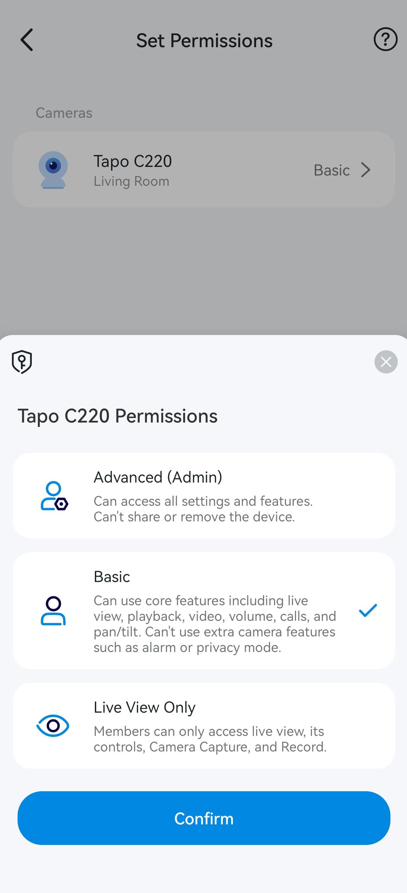
Official TP-Link example of device-level sharing permissions. Rollout and app availability vary. Manufacturer guide
Confirm the result
Have the recipient accept the invitation in their own account, open the intended camera and test the exact recording and setting they need. Confirm that unrelated devices and sensitive controls are not unnecessarily exposed.
When to contact us
Send our Support Specialist both app versions, the sharing screen/tier, camera version and whether the clip is local or cloud. Provide account identifiers only privately; never send passwords or public invitation screenshots.
Related ACE guides
Updated 260702