
Frequently Asked Question
AOMEI Backupper: Choose Backup or Clone and Make Your First System Backup
ACE KNOWLEDGE BASE · AOMEI
Choose the right task, make an image and check your recovery path.
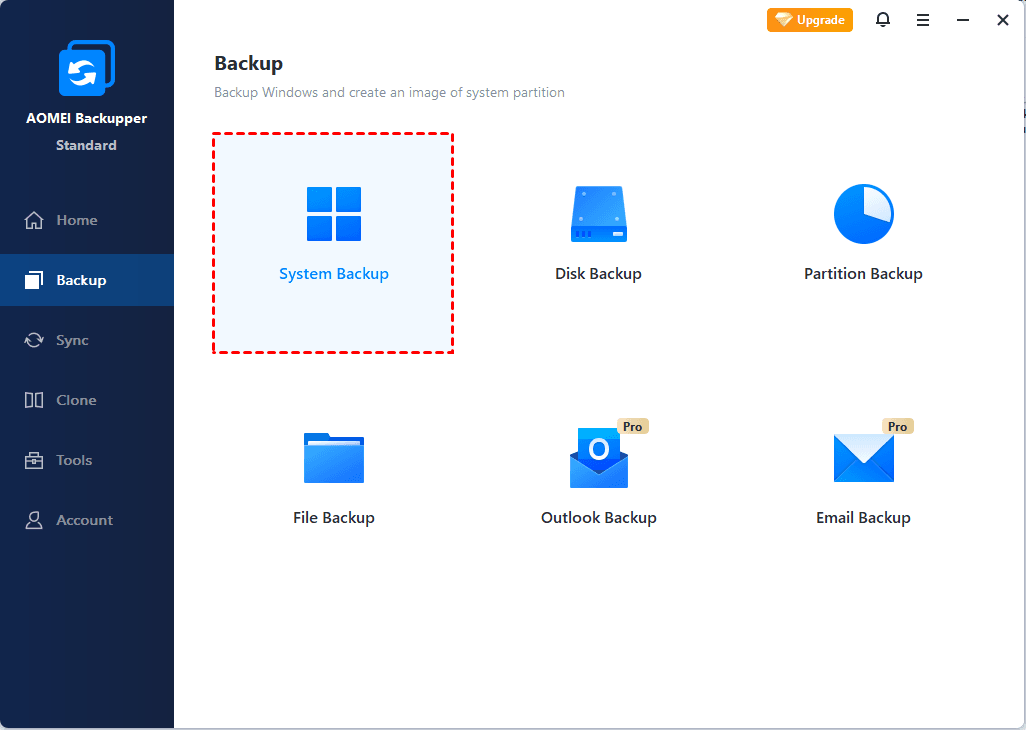
Official AOMEI illustration: Backup → System Backup. The installed edition and version may show different options. Select the image to enlarge.
Start with the outcome: use a backup image for recovery points; use a clone when moving Windows or a disk to another drive. Restoring an image is a separate operation that writes data back to a selected destination.
Choose the right task
- System Backup: images the running Windows system and its required boot partitions. Files on separate data volumes may need their own backup task.
- Disk Clone: copies a disk to another disk. System Clone copies Windows and its required partitions, rather than every separate data partition.
- Restore: returns an existing image to a destination. System, disk and partition restore can overwrite that destination.
Create the first system backup
- Confirm your exact Backupper edition, version and Windows environment. Windows Server needs an appropriate Server-capable edition; do not assume a PC licence covers it.
- Open Backup → System Backup. Review the automatically selected system partitions.
- Choose the intended destination with enough free space. Check the path yourself rather than accepting a default drive without review. Keep recovery copies separate from the source disk where practical.
- Name the task, review any schedule and retention choices, then select Start Backup. Feature availability varies by edition.
- Review the completion result and log. Use Tools → Check Image to validate the required backup point.
Check that you can recover
A successful image check is useful, but it is not a complete recovery rehearsal. Confirm that rescue media can see the image and storage, and plan a controlled restore test. Preserve any password needed to open an encrypted image through your organisation's approved process.
Need help? Send our Specialist the product/edition, version, Windows version, task type, destination type and exact error. Do not send licence keys, passwords or unredacted confidential files.
Official references: Backup and clone · System Backup · Check Image
Need a hand with your setup?
Tell our Support Specialist the exact model, version, symptom and checks already completed. Redact private information from screenshots.
Submit TicketUpdated 260123