Frequently Asked Question
Insta360 Studio: Why does my YouTube upload play as a flat video instead of interactive 360?
ACE SUPPORT · INSTA360
A normal flat export and an interactive 360 export are different deliverables. Check the Studio project, preserve spherical metadata and test YouTube playback before sharing.
Applies to
360 footage from X5, X3, ONE X2 and ONE RS edited in supported Insta360 Studio versions, then uploaded to YouTube. Single-lens clips and an already reframed flat export cannot become a complete captured sphere just by changing an upload setting.
Before you begin
A 2:1 image shape alone does not prove correct spherical metadata. Avoid repeatedly uploading a full private recording while testing; use a short non-sensitive sample.
Work through these checks
- Confirm that the source is the complete 360 recording and keep its originals. If you intentionally exported a reframed view for a normal screen, return to the 360 source rather than re-uploading the same flat file.
- Use current Insta360 Studio. Its Project-page 360 workflow requires version 5.6.1 or later: create the project and set Aspect Ratio to 2:1 (360° Panorama). Edit within that 360 project.
- At Export, choose the preset for the target viewing/sharing platform. Save a short test file directly from this workflow before adding another video editor, messenger or conversion service.
- If you edit again outside Studio, use the external editor's VR sequence/export workflow and retain the spherical metadata that identifies the file to YouTube. Follow Google's current preparation guidance when metadata needs adding; changing a filename or thumbnail is insufficient.
- Upload the test and allow processing to finish. YouTube states that 360 playback can take up to an hour to become available. Check it on a supported current desktop browser or in the YouTube app.
- Before publishing or sharing, verify a pan control or click-and-drag view on desktop. On a phone, test in the YouTube app rather than assuming an embedded preview has the same controls.
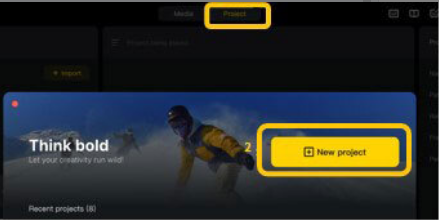
Official Insta360 Studio Project-page illustration showing the 360 Panorama workflow. Manufacturer guide
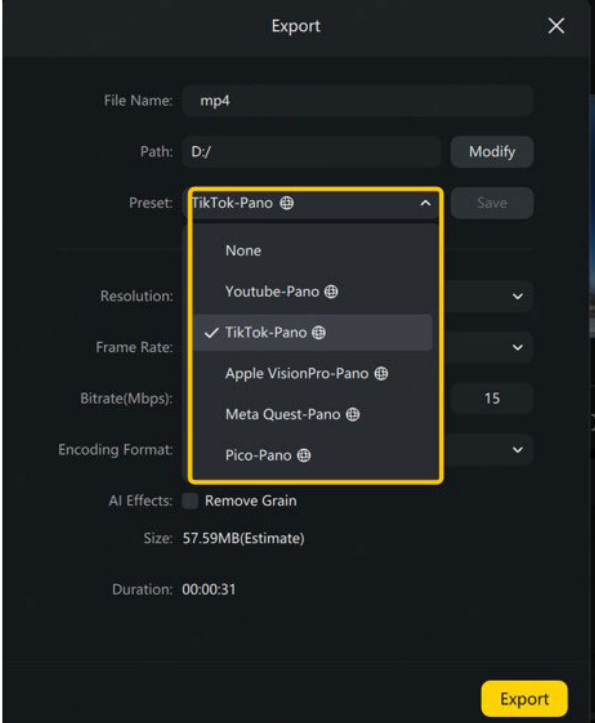
Official Insta360 Studio 360 export-preset illustration. Manufacturer guide
Confirm the result
You should be able to look around the uploaded scene. Compare the direct Studio test with any later edited version to identify the stage where interactivity was lost.
When to contact us
Submit Ticket for a Studio export problem with the source camera, Studio version, project aspect ratio and export settings. If a valid spherical export works locally but YouTube still rejects it, include its processing status and use YouTube's support route.
Related ACE guides
Updated 261105